Key takeaways
- The best expense management software automates receipt capture, approval workflows, and accounting sync to replace manual processes that 76%23 of employees still rely on using tools not built for the task.
- Top platforms for 2026 include OFX, Brex, Ramp, SAP Concur, Expensify, and Zoho Expense, each suited to different business sizes and use cases.
- Prioritize features such as corporate card controls, real-time spend visibility, AI-powered receipt matching, and multi-currency expense support.
- For global SMEs, platforms that combine expense management with cross-border payments and multi-currency accounts offer the most value.
Managing employee expenses with spreadsheets, paper receipts, and email-chain approvals costs finance teams hours every week and leaves gaps in spend visibility. For growing businesses, those gaps turn into budget overruns, delayed reimbursements, and compliance headaches.
Modern expense management software solves this by automating the entire expense management process, from receipt capture to accounting sync, giving finance leaders control and clarity over company-wide spending. This article compares 10 of the best expense management software platforms in the US, breaks down the features and pricing that matter most, and explains how OFX Spend Management brings expense tracking and global payments together in one place.
Summary:
• What Is Expense Management Software?
• How can expense management software improve manual expense processes?
• The top 10 expense management software platforms in the US
• Expense management software comparison table
• Key features to look for in expense management solutions
• Benefits of expense management software
• How to choose the right expense management software
• Best practices for implementing expense management software
• Why are businesses choosing to manage their expenses with OFX?
What Is Expense Management Software?
Expense management software is designed to make it easier for businesses to track, approve, and reimburse spending.
The best solutions automate the entire expense management process, eliminating the need for manual data entry and giving finance teams up-to-date financial insights about company spending habits. Today’s leading platforms are cloud-based, meaning teams can submit, review, and approve expenses from anywhere on any device.
A key distinction worth noting: expense management software focuses on employee expense management, including receipt capture, reimbursements, and policy compliance. Spend management software covers a broader scope, such as vendor payments, procurement, budgets, and company-wide financial controls. Some platforms, like OFX, bring both together in a single ecosystem.
Though the specific features of different software solutions tend to vary, most typically include:
- Expense tracking with receipt capture or receipt scanning.
- Expense report creation with automatic categorization of different types of expenses.
- Approval workflows that enforce a company’s specific expense policies.
- Proactive policy enforcement that prevents non-compliant spending at the point of purchase, rather than flagging violations after the fact.
- Reimbursement processes to pay employees quickly and fairly.
- Accounting software integrations to ensure quick and accurate reconciliation.
By automating all of these steps, expense management software can reduce the chance of errors, save time, and ensure strict compliance with a company’s rules around expenses.
Smarter Spend Management with OFX
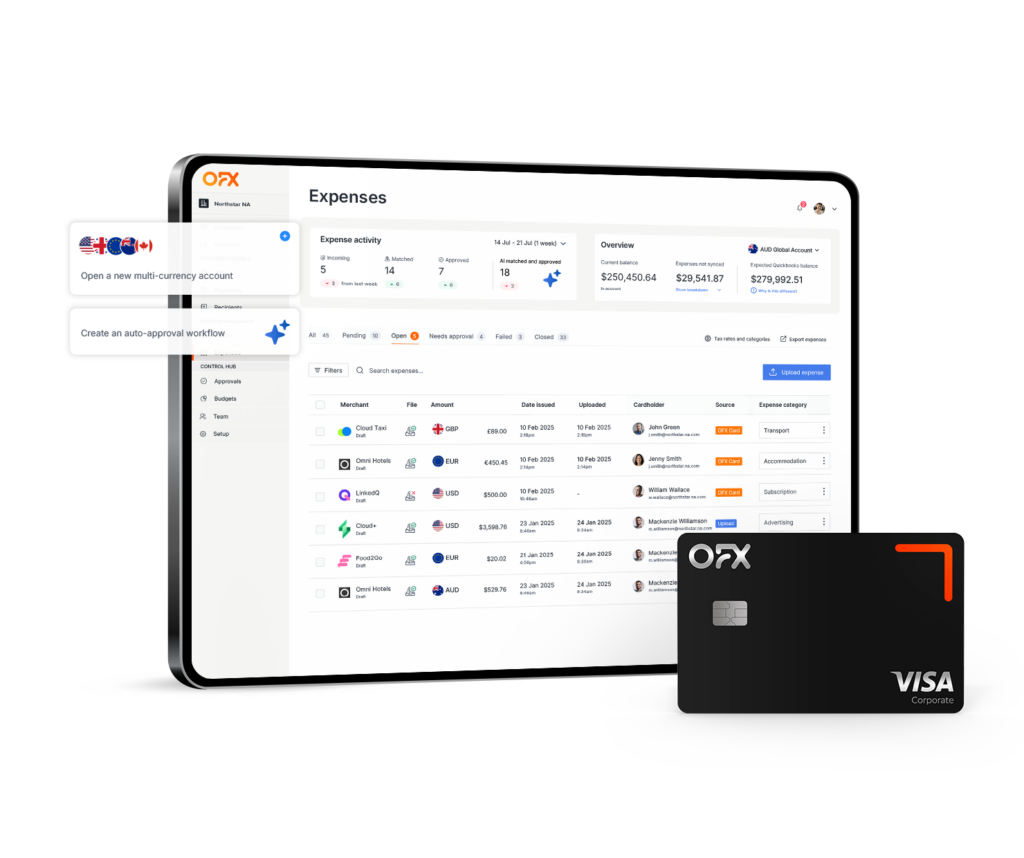
Track spend, issue corporate cards, and manage reimbursements all in one place with integrated expense management software
How can expense management software improve manual expense processes?
While no two platforms are the same, most expense management systems follow a similar basic structure:
- Submit expenses: Employees scan receipts or enter purchase details for their own expenses using a mobile app or desktop dashboard.
- Approve expenses: Managers review each expense and approve or reject based on company guidelines.
- Reimburse employees: Once approved, reimbursements are processed through integrated payroll or banking systems.
- Sync to accounting: All data is synced with your accounting software to keep financial records up to date.
With the right tools, this expense management system can be made even more efficient. Most modern software solutions also offer:
- OCR receipt scanning to capture data from paper receipts
- Automated approval workflows that match your internal processes
- Policy enforcement tools that ensure expense claims are compliant
- Multi-currency support for businesses with global operations
- Real-time expense reports and automated expense reporting for greater financial visibility
These features help reduce manual errors, eliminate unnecessary delays, and give finance teams the clarity they need to make well-informed decisions.
The top 10 expense management software platforms in the US
The number of expense management solutions available in the US is both a blessing and a challenge. Businesses have a wide range of tools to choose from, each offering different features, pricing models, and benefits.
We’ve broken down the leading providers side by side and grouped them by the type of business they best serve.
For growing startups, medium-size businesses, and automation
If your business needs easy-to-use automation and reporting for everyday expense management, the following tools strike a good balance between simplicity and functionality.
If your business needs easy-to-use automation and reporting for everyday expense management, the following tools strike a good balance between simplicity and functionality.
OFX 1
OFX brings expense management and international payments together in one place. With multi-currency accounts, corporate cards, and built-in financial tools, it saves businesses the hassle of having to juggle multiple platforms. The Standard plan is free, Full Suite is $75/month, with 1% unlimited cashback on Corporate Cards.
Key features:
- Unlimited virtual and physical corporate cards with spending policies
- Automated OCR receipt capture and expense categorization
- Match receipts to transactions with intelligent AI automation
- Mobile app real-time expense tracking and reimbursements
- Automated approval workflows and expense policy enforcement
- Accounting integrations with QuickBooks, Xero
- Multi-currency accounts, with the ability to spend 30+ currencies in over 170 countries at competitive rates.
Pros:
- Combines expense management and global payments in one platform.
- Strong support for multi-currency business expenses.
- Real-time visibility and reporting.
Cons:
- Digital-only platform (no physical branches).
Best for: Businesses with international payments and operations that want both expense management and financial control in one system.
Expensify 2
Expensify is one of the longest-standing names in expense management. It’s known for its user-friendly mobile app and simple automations. Business plans start at $5/user/month for the Collect plan12.
Key features:
- Receipt scanning and automatic expense categorization.
- Expense tracking and reimbursements.
- Mobile-first platform designed for simple use.
Pros:
- Easy to use with a clean, intuitive mobile app.
- Strong accounting software integrations.
- Automates expense reporting effectively.
Cons:
- Access to advanced features is restricted to higher-tier plans.
Best for: Businesses that want straightforward automation and an easy setup process.
Brex 3
Brex is aimed at startups and scale-ups. Its AI-driven expense review helps businesses ensure compliance while keeping costs down. Brex offers a free Essentials plan for startups, with premium plans starting at $12/user/month13.
Key features:
- Free plan for startups.
- AI-powered compliance enforcement.
- Virtual corporate cards.
- Real-time expense tracking and categorization.
Pros:
- Free entry-level plan available.
- Strong focus on policy compliance.
- Easy to issue virtual corporate cards.
Cons:
- Lacks some advanced enterprise features.
- Focused primarily on startups and growing teams.
Best for: Startups looking for cost-effective expense management.
Emburse 4
Emburse is focused on efficiency and compliance. Its autofill and analytics capabilities help mid-size businesses automate expense tracking and gain deeper insights into spending patterns. Pricing is available on request.
Key features:
- Automated expense report creation with autofill.
- Customizable approval workflows and policy enforcement.
- Analytics dashboards for spend analysis.
Pros:
- Strong compliance and audit trail features.
- Good fit for mid-size organizations with complex approval needs.
Cons:
- Pricing isn’t publicly listed, which can slow the evaluation process.
Best for: Mid-size businesses that need detailed spend analytics and customizable workflows.
For enterprise and complex organizations
These platforms are designed for larger businesses or companies with advanced reporting, travel management, or ERP integration requirements.
SAP Concur 5
SAP Concur is one of the most established enterprise expense management platforms. It offers deep integration with SAP’s broader ERP ecosystem and is built for organizations with complex travel and expense policies. Plans start at approximately $9/report for the Standard tier15.
Key features:
- End-to-end travel and expense management.
- Integration with SAP ERP and third-party accounting software.
- Automated policy enforcement and audit tools.
- Multi-currency and multi-entity support.
Pros:
- Deep enterprise integrations.
- Comprehensive travel and expense management in one platform.
- Strong compliance and audit capabilities.
Cons:
- Can be complex to implement and configure.
- Pricing can be high for smaller businesses.
Best for: Large enterprises with complex travel and expense workflows.
Navan 6
Navan (formerly TripActions) combines corporate travel booking with expense management, making it a strong choice for businesses where travel is a significant spend category. Navan offers a free plan for expense management16, with premium travel features available on paid tiers.
Key features:
- Integrated travel booking and expense tracking.
- Real-time spend visibility and policy controls.
- Corporate card with automatic receipt matching.
- Rewards program for employees who book under budget.
Pros:
- Combines travel and expense management seamlessly.
- Real-time visibility into travel spend.
- Employee-friendly rewards for cost-conscious booking.
Cons:
- Travel-focused features may be unnecessary for businesses with minimal travel spend.
Best for: Businesses with significant corporate travel budgets.
For small businesses and cost-conscious teams
If you need a lightweight, affordable tool to manage everyday expenses, these platforms deliver solid functionality without enterprise complexity.
Zoho Expense 7
Zoho Expense is part of the Zoho ecosystem and offers affordable expense management for small to mid-size businesses. Plans start at $3/user/month, with a free tier for up to 3 users17.
Key features:
- Receipt scanning and mileage tracking.
- Automated approval workflows.
- Integration with Zoho Books, QuickBooks, and Xero.
- Multi-currency support.
Pros:
- Very affordable, with a free plan for small teams.
- Strong integration with the broader Zoho suite.
- Easy to set up and use.
Cons:
- Limited advanced features compared to larger platforms.
- Reporting can feel basic for growing teams.
Best for: Small businesses and teams already using Zoho products.
Ramp 8
Ramp offers a finance automation platform. Its corporate card comes with built-in expense management, and the platform recommends ways to manage spend. Ramp’s software is free to use18, with revenue generated through card interchange.
Key features:
- Corporate cards with cashback.
- AI-powered spend analysis.
- Automated receipt matching and categorization.
- Real-time spend controls and policy enforcement.
Pros:
- Strong mobile app with intuitive expense submission and approval workflows.
- Spend management recommendations powered by AI.
- Cashback rewards program that turns everyday spending into savings.
Cons:
- Requires use of Ramp’s corporate card.
- Primarily US-focused, with limited multi-currency support compared to global-first platforms.
Best for: US-based businesses that want a card-first expense management solution.
BILL Spend & Expense (Divvy) 9
BILL Spend & Expense, formerly known as Divvy, offers free expense management software paired with corporate cards. It’s designed for small and mid-size businesses that want real-time budget controls. The platform is free to use19, with revenue earned through card transactions.
Key features:
- Real-time budget tracking and spend controls.
- Virtual and physical corporate cards.
- Automated receipt capture and expense categorization.
- Integration with QuickBooks, Xero, and NetSuite.
Pros:
- Free to use with no subscription fees.
- Strong real-time budgeting tools.
- Easy corporate card issuance.
Cons:
- Requires use of BILL’s corporate card.
- International and multi-currency support is limited.
Best for: Small to mid-size US businesses that want free, budget-focused expense management.
Rippling 10
Rippling brings HR, IT, and finance together in one platform, with expense management as part of its broader workforce management suite. Expense management starts at $14/employee/month20.
Key features:
- Unified HR, payroll, and expense management.
- Policy-based automated approvals.
- Corporate cards with spend controls.
- Integration with QuickBooks, Xero, NetSuite, and Sage Intacct.
Pros:
- Consolidates HR, IT, and finance workflows in one platform.
- Highly rated for integration and deployment.
- Flexible policy engine.
Cons:
- Expense management is part of a broader suite, so costs can add up if you only need expense tracking.
- Overkill for businesses that don’t need HR and IT management.
Expense management software comparison table
This expense management software comparison consolidates features and pricing across all 10 platforms reviewed. Use it to quickly shortlist the tools that match your needs.
| Platform | Best for | Monthly Fees | Corporate cards | Multi-currency | Accounting integrations | Free trial |
|---|---|---|---|---|---|---|
| OFX 11 | Global SMEs | Free Standard Plan, $75/month Full Suite | Yes | 30+ currencies | QuickBooks, Xero | Yes |
| Expensify 12 | Simple automation | $5-$18+ per user | Yes | Limited | QuickBooks, Xero, NetSuite, Sage | Yes |
| Brex 13 | Startups | $0-$12 per user | Yes | Limited | QuickBooks, Xero, NetSuite | Yes |
| Emburse 14 | Mid-size compliance | $8-$12 per user | Yes | Yes | QuickBooks, Xero, SAP | Demo |
| SAP Concur 15 | Enterprise | Custom pricing | Yes | Yes | SAP, Oracle, QuickBooks | Demo |
| Navan 16 | Travel + expenses | $0-$15+ per user | Yes | Yes | QuickBooks, Xero, NetSuite, Sage | Demo |
| Zoho Expense 17 | Small business | $0–$6 per user | No | Yes | Zoho books, QuickBooks, Xero, Sage | Yes |
| Ramp 18 | Card-first + spend automation | $0-$15 per user | Yes (required) | Limited | QuickBooks, Xero, NetSuite, Sage, Microsoft | Yes |
| BILL (Divvy) 19 | Budget controls | Free | Yes (required) | Limited | QuickBooks, Xero, NetSuite, Sage, Microsoft | Yes |
| Rippling 20 | Unified HR + finance | $8-$29 per user | Yes | Limited | QuickBooks, Xero, NetSuite, Sage | Demo |
Key features to look for in expense management solutions
As expense management technology evolves, certain features have become essential for businesses seeking efficiency and control. Must-have capabilities in 2026:
Automated Receipt Capture – Look for advanced OCR technology that extracts data with 99%+ accuracy from receipts, invoices, and bills, eliminating manual entry completely.
Corporate Card Integration – Real-time transaction syncing between your expense platform and corporate cards to provide instant visibility into spending, eliminate out of policy payments and help prevent fraud with automatic merchant identification
Customizable Approval Workflows – Your solution should offer configurable multi-level approval paths that adapt to your organizational structure and spending thresholds
Accounting Software Integration – Seamless connections with platforms like QuickBooks and Xero, are now standard expectations for data consistency
Mobile Accessibility – Robust mobile apps that function offline and allow receipt scanning, expense submission, and approvals from anywhere are non-negotiable.
Benefits of expense management software
Operational Efficiency
- Reduced Processing Costs: Automated systems cut expense processing costs by up to 70% compared to manual methods21
- Time Savings: OCR technology decreases data entry time by 50% or more22, allowing your team to focus on strategic work
- Streamlined Workflows: Approval processes that once took weeks can be completed in days or even hours
Your accounting team can process hundreds of receipts in the time it previously took to handle dozens, saving hours, reducing errors, and letting your people stay focused on what really matters.
Financial Control and Visibility
- Error Reduction: Automated validation catches mistakes before they become costly problems
- Fraud Prevention: Built-in compliance checks flag suspicious activities, potentially saving expensive fraudulent claims
- Real-Time Reporting: Access to current spending data enables better budgeting and forecasting decisions
This level of visibility into spending patterns, makes it easier to spot potential cost-saving opportunities that could be missed with paper-based processes.
Enhanced Employee Experience
- Faster Reimbursements: Employees could receive their money back in days rather than weeks
- User-Friendly Interfaces: Mobile apps allow for receipt capture and submission anywhere
- Reduced Frustration: No more lost receipts or confusing submission processes
When your team spends less time managing expenses, workplace satisfaction improves. Employees appreciate efficient systems that respect their time and ensure prompt reimbursement.
How to choose the right expense management software
With so many platforms available, the right choice depends on your specific business context. These four criteria will help you narrow the field.
Match the platform to your business size and stage
Expense management software for small business teams (under 50 employees) should prioritize simplicity, quick setup, and low cost. Platforms like Zoho Expense or Expensify fit this profile well. Mid-market businesses (50 to 250 employees) typically need multi-entity support, layered approval chains, and integrations that can handle more complex organizational structures.
Evaluate total cost of ownership
Starting price is only part of the equation. Factor in per-user fees, implementation costs, card program charges, and any hidden FX markups for international transactions. Free platforms like Ramp and BILL generate revenue through card interchange, which may limit your flexibility.
Prioritize integration with your accounting stack
The right expense management system should sync directly with your accounting platform. Two-way integrations with QuickBooks, Xero, or NetSuite are ideal because they eliminate manual journal entries and keep your books audit-ready. Avoid platforms that only support CSV exports, as these create reconciliation delays and increase error risk.
Consider global and multi-currency needs
If your business operates across borders, prioritize platforms with multi-currency wallets and local payment rails. Paying employees in local currencies, holding balances without unnecessary conversions, and accessing competitive exchange rates can save thousands annually. OFX supports 30+ currencies across 170+ countries, combining expense management with global payments in a single platform.
Best practices for implementing expense management software
Rolling out a new expense management platform goes more smoothly when you plan ahead. Follow these steps to set your team up for success:
- Assemble stakeholders early. Bring together finance, IT, and department managers before selecting a platform. Each group has different requirements, and early alignment prevents costly rework.
- Audit your current workflows. Map out how expenses are submitted, approved, and reconciled today. Identify bottlenecks, pain points, and compliance gaps so you can configure the new system to address them directly.
- Define clear expense policies. Document spending limits, approved categories, receipt requirements, and approval thresholds before launch. Build these rules into the platform so enforcement is automatic.
- Phase the rollout. Start with a pilot team or department, gather feedback, and refine workflows before expanding company-wide. This reduces disruption and builds internal champions who can support wider adoption.
Why businesses are choosing to manage their expenses with OFX
OFX gives growing businesses a single platform to manage expenses, issue corporate cards, process reimbursements, and make global payments. Here’s what sets it apart:
- Automate approval flows and enforce expense policies
- Automate receipt capture with OCR and track expenses in a mobile app
- Match receipts to transactions with Intelligent AI automation
- Get real-time cash flow visibility with 2-way sync to QuickBooks and Xero
- Issue unlimited corporate cards (physical and virtual)
- 1% unlimited cashback on Corporate Cards, turning everyday business spending into savings.
- 30+ currencies across 170+ countries, so your team can spend and get reimbursed in local currencies without unnecessary conversions.
- Send bulk batch payments domestically or internationally with ease
- ISO 27001:2022 certification, meeting internationally recognized standards for information security management.
- 24/7 human phone support, dedicated account manager and help onboarding
OFX combines the tools that finance teams use every day: cards, expenses, approvals, payments, FX, and accounting sync, all in one platform with transparent pricing and support you can reach around the clock.
To discover how you can gain more control over your expenses with OFX, take our virtual tour and book a free demo today.
Best expense management software FAQs
What is expense management software?
Expense management software automates how businesses track, approve, and reimburse employee spending. It replaces manual processes like spreadsheets and paper receipts with digital workflows that capture expenses in real time, enforce company policies, and sync approved claims directly to your accounting software.
What features should I look for in expense management software?
Prioritize automated receipt capture (OCR), corporate card controls, customizable approval workflows, accounting software integrations, and AI-powered automation for receipt matching and categorization. For international businesses, multi-currency support is also essential.
How much does expense management software cost?
Pricing varies widely. Some platforms are free as revenue is generated through card interchange. Others charge per user, or on a tiered subscription basis. Factor in per-user fees, implementation costs, card program charges, and any hidden FX markups for international transactions to understand the true total cost of ownership.
What’s the difference between expense management and spend management?
Expense management focuses on employee expense management: submitting receipts, approving claims, and processing reimbursements. Spend management covers broader company-wide financial controls, including vendor payments, procurement, budgeting, and AP automation. Some platforms, like OFX Spend Management, combine both.
Can expense management software integrate with my accounting platform?
Yes. Most modern platforms offer direct integrations with popular accounting tools like QuickBooks, Xero, and NetSuite. Look for two-way sync rather than CSV-only exports, as this keeps your books up to date automatically and reduces reconciliation errors.
Is expense management software secure?
Reputable platforms use bank-level encryption, multi-factor authentication, and role-based access controls to protect financial data. Industry benchmarks to look for include ISO 27001 certification and SOC 2 compliance, both of which indicate rigorous data security and privacy practices.
What is the best expense management software for small businesses?
The best option depends on your team size and growth stage. Platforms like Zoho Expense and Expensify suit smaller teams with straightforward expense needs. OFX and Ramp serve growing businesses with more complex requirements, including multi-currency support and corporate card programs.
Does Excel have an expense tracker?
Microsoft Excel offers customizable spreadsheet templates for basic expense tracking, but it lacks automated receipt capture, approval workflows, and real-time reporting that dedicated expense management software provides. For businesses processing more than a handful of expense claims per month, a purpose-built platform will save significant time and reduce errors.
Are virtual cards supported in expense management software?
Some platforms, including OFX, offer virtual cards. These are great for online purchases or controlling recurring software subscriptions. You can set spending limits, cancel cards instantly, and monitor usage in real time.
Can expense management software handle multi-currency expenses?
Yes. For businesses that operate across borders, multi-currency support is critical. OFX offers corporate multi-currency cards and accounts that let you spend in local currencies and avoid unnecessary exchange fees.
Can these tools reimburse employees automatically?
Yes. Many systems automatically reimburse expenses once a claim is approved. This reduces delays and cuts down manual banking tasks. You’ll need to connect your payroll or bank details to activate this feature.
What are the top expense management software solutions in USA in 2026?
Here are some of the top expense software solutions in the USA:
- OFX
- Expensify
- Brex
- Emburse
- SAP Concur
- Navan
- Zoho Expense
- Ramp
- BILL (Divvy)
- Rippling
What’s the best option for managing global spending?
OFX stands out for US businesses managing international expenses. Its multi-currency cards, global account access, and international payment tools make it ideal for cross-border operations.
Looking for a better way to manage
your business expense?
References
- https://www.ofx.com/en-us/business/spend-management/
- https://www.expensify.com/
- https://www.brex.com/support/expense-management
- https://www.emburse.com/
- https://www.concur.com/en-us/expense-management
- https://navan.com/product/expense-management
- https://www.zoho.com/us/expense/
- https://ramp.com/expense-management
- https://www.bill.com/product/expenses
- https://www.rippling.com/expense-management
- https://www.ofx.com/en-us/business/pricing/
- https://www.expensify.com/pricing
- https://www.brex.com/pricing
- https://www.emburse.com/products/spend/pricing
- https://www.concur.com/en-us/expense-management
- https://navan.com/pricing
- https://www.zoho.com/us/expense/pricing/
- https://ramp.com/pricing
- https://www.bill.com/product/pricing#business
- https://www.outsail.co/post/how-much-does-rippling-cost
- https://www.concur.com/en-us/resource-center/reports/forrester-improve-travel-expense-invoice-management-solution-to-drive-better-ex
- https://www.peeriosity.com/shared-services/articles/2018/04/improving-accounts-payable-processing-efficiency-through-ocr-technology/
- https://www.prnewswire.com/news-releases/the-evolution-of-expense-management-tools-in-2026-findity-ab-302747056.html