
If your business is still processing piles of paper receipts or reconciling spending with spreadsheets, you’re not alone. Finance teams dedicate over 20 hours each month1 to manually processing expenses, that’s more than half a workweek spent on tedious administrative tasks that could be automated. But with the right tools, managing your expenses could be so much easier.
Today’s expense management software can help you automate approvals, track every dollar, and see company-wide spending in real time. It’s faster, smarter, and more accurate than manual processes, which means better control over your business’s bottom line. The numbers speak for themselves: a study2 by SAP Concur (2019) found companies implementing automated expense management software experienced a 70% reduction in time spent on expense processing.
Still, choosing the best expense management software can be a difficult decision. With so many options available, from lightweight apps to comprehensive financial platforms, how do you know what’s right for you? This guide will help you find a solution that fits the unique needs of your business. We’ll explain how expense management software works, compare some of the best solutions available, and explore why many Australian businesses are using OFX Spend Management to streamline their financial processes.
Summary:
• What is expense management software?
• How can manual expense processes be improved?
• 10 of the best expense management software solutions in 2025
• What are the benefits of modern expense management systems?
• Key features to look for in expense management software
• Compare the top 10 expense management solutions in Australia
• Best practices for implementing expense management software
• How expense management software saves time & money
• Why are Australian businesses choosing OFX for expense management?
• Best expense management software FAQs
What is expense management software?
Expense management software helps businesses track, approve, and control their spending. At its core, expense management software is designed to:
- Record employee expenses (like meals, travel, and subscriptions)
- Process expense claims and reimbursements
- Enforce company policies
- Integrate with accounting systems to simplify bookkeeping
Smarter Spend Management with OFX
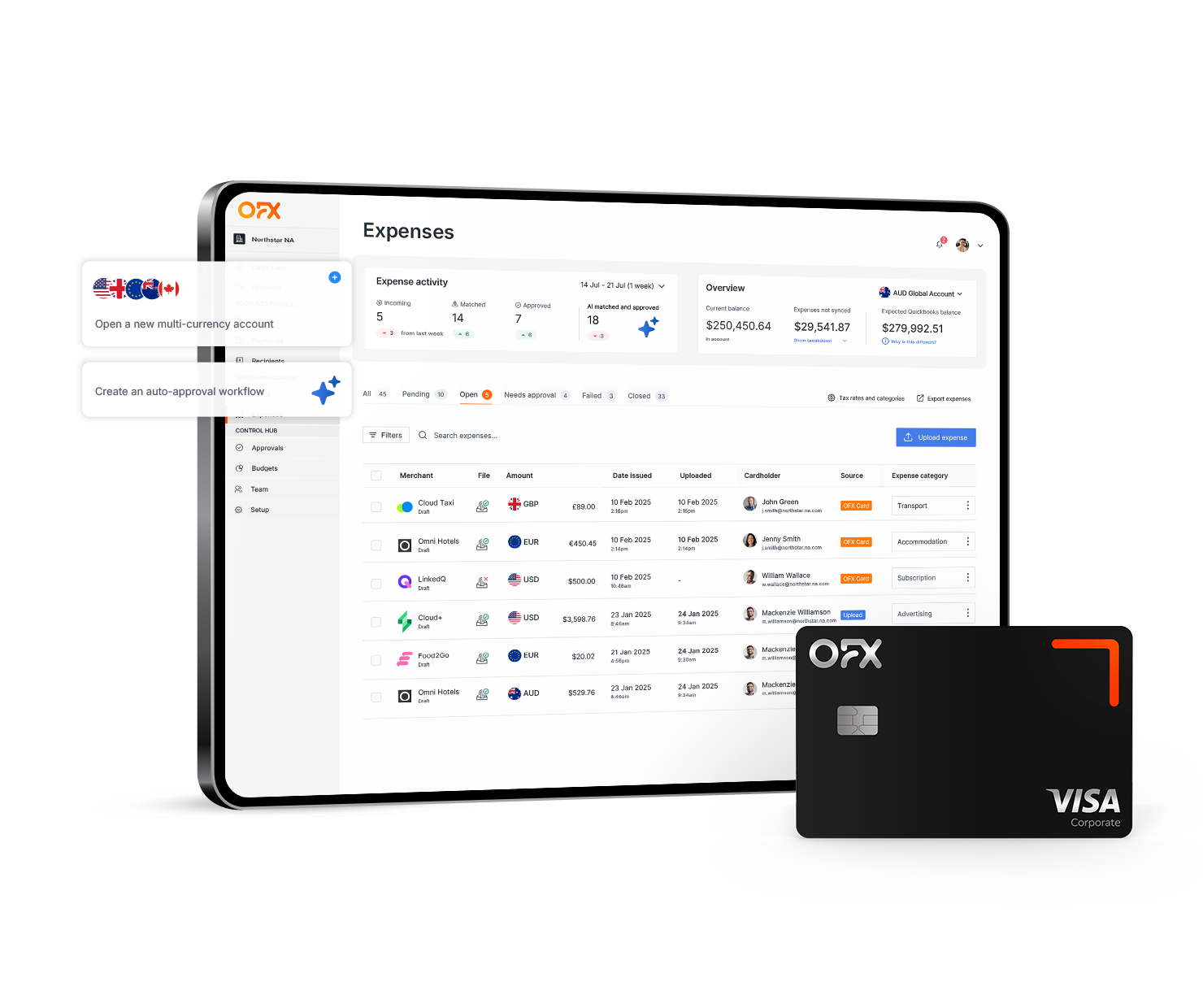
Track spend, issue corporate cards, and manage reimbursements all in one place with integrated expense management software.
How can expense management software improve manual expense processes?
Though financial procedures vary from business to business, a typical expense management system works like this:
- Submit expenses: Employees scan receipts, enter details, and submit an expense claim through a mobile app or desktop portal.
- Approve expenses: Managers review and approve (or reject) claims based on company policies.
- Reimburse employees: Once approved, reimbursements are processed through integrated payroll or banking systems.
- Sync with accounting: Approved claims sync automatically with accounting software for reconciliation and reporting.
However, with the right tools this system can be made even more efficient. Most modern software solutions also offer:
- Receipt capture with OCR technology that extracts key data from paper or photographed receipts automatically
- Automated approval workflows to save admin time and reduce bottlenecks
- Policy enforcement to ensure compliance with company spending rules
- Real-time data that gives visibility into spending trends and budget usage
- Multi-currency support for businesses with global operations
- Integration with financial systems to reduce human error in reconciliation
These features help reduce manual errors, eliminate unnecessary delays, and give finance teams the clarity they need to make well-informed decisions.
10 of the best expense management software solutions in 2025
To help get the ball rolling with your search, here’s a high-level overview of some of Australia’s most popular expense management software options:
1. OFX
OFX brings something unique to the table. It’s an all-in-one platform for international payments, currency exchange, and now, with its business spend tools, expense management. OFX’s multi-currency corporate cards simplify control of cross-border expenses, and its strong regulatory backing gives businesses added peace of mind.
2. Xero
Xero is a leading cloud-based accounting platform popular among Australian small businesses. It includes features for tracking reimbursements, managing bills, and syncing with banks. Xero’s expense tools support multi-currency tracking, though it lacks employee cards, so businesses needing that functionality may need to look to another provider.
3. Expensify
Expensify helps automate expense tracking with tools like receipt scanning, automatic categorisation, and mobile approvals. It integrates well with platforms like Xero and NetSuite, making it ideal for growing businesses. While easy to use, its per-user pricing may be cost-prohibitive for smaller teams.
4. SAP Concur
SAP Concur offers an enterprise-grade solution that combines travel, invoice, and expense management. It supports mobile expense reporting, custom approval flows, and integration with enterprise report planning (ERP). Concur is best suited to large companies with complex approval needs and in-house IT support.
5. QuickBooks
QuickBooks delivers all-in-one accounting and expense management. Features include receipt scanning, category tagging, and integration with apps like PayPal and Shopify. QuickBooks is affordable and scalable, but it lacks dedicated corporate cards, and its more advanced features can be complex to set up and manage, especially for smaller teams without in-house accounting expertise.
6. MYOB
MYOB is a go-to solution for Australian SMEs, offering GST tracking, payroll, and invoicing. Its expense features are basic but effective for smaller operations. However, it lacks corporate cards and multi-currency support, making it less suitable for scaling businesses with a global footprint.
7. Volopay
Volopay is a modern financial platform built for APAC businesses. It provides virtual and physical corporate cards, custom workflows, and real-time tracking. Volopay also integrates with Xero and MYOB, making it a flexible solution for regional companies that need robust spend control.
8. Zoho Expense
Part of the Zoho suite, Zoho Expense allows for travel booking, automated expense claims, and mobile submission. Its strength lies in integration across Zoho’s CRM and finance tools, making it ideal for businesses already using the Zoho software suite.
9. Airwallex
Airwallex offers expense management through corporate cards and built-in budget controls. It supports multi-currency transactions, making it valuable for businesses with overseas teams. However, it currently lacks physical POS integration.
10. Weel
Weel is an Australian fintech that offers virtual cards, expense automation, and budget management tools. It’s popular among finance teams who want tight control over department or project-based spending. DiviPay is feature-rich, though its focus on supporting smaller teams may limit scalability.
What are the benefits of modern expense management systems
Modern expense management systems provide advantages that can directly impact your bottom line. By transitioning from manual processes to automated solutions, you can experience benefits across multiple areas of your business operations.
Operational Efficiency
- Reduced Processing Costs: Automated systems cut expense processing costs by up to 70% 2 compared to manual methods
- Time Savings: OCR technology decreases data entry time by 50% 3 or more, allowing your team to focus on strategic work
- Streamlined Workflows: Approval processes that once took weeks can be completed in days or even hours
For example, your accounting team can process hundreds of receipts in the time it previously took to handle dozens, saving hours, reducing errors, and letting your people stay focused on what really matters.
Financial Control and Visibility
- Error Reduction: Automated validation catches mistakes before they become costly problems
- Fraud Prevention: Built-in compliance checks flag suspicious activities, potentially saving expensive fraudulent claims
- Real-Time Reporting: Access to current spending data enables better budgeting and forecasting decisions
This level of visibility into spending patterns, makes it easier to spot potential cost-saving opportunities that could be missed with paper-based processes.
Enhanced Employee Experience
- Faster Reimbursements: Employees could receive their money back in days rather than weeks
- User-Friendly Interfaces: Mobile apps allow for receipt capture and submission anywhere
- Reduced Frustration: No more lost receipts or confusing submission processes
When your team spends less time managing expenses, workplace satisfaction improves. Employees appreciate efficient systems that respect their time and ensure prompt reimbursement.
Key features to look for in expense management solutions
As expense management technology evolves, certain features have become essential for businesses seeking efficiency and control. Here’s what to consider in 2025:
Must-Have Capabilities:
Automated Receipt Capture – Look for advanced OCR technology that extracts data with 99%+ accuracy from receipts, invoices, and bills, eliminating manual entry completely.
Corporate Card Integration – Real-time transaction syncing between your expense platform and corporate cards to provide instant visibility into spending, eliminate out of policy payments and help prevent fraud with automatic merchant identification.
Customisable Approval Workflows – Your solution should offer configurable multi-level approval paths that adapt to your organisational structure and spending thresholds.
Accounting Software Integration – Seamless connections with platforms like Xero, QuickBooks, and Employment Hero are now standard expectations for data consistency.
Mobile Accessibility – Robust mobile apps that function offline and allow receipt scanning, expense submission, and approvals from anywhere are non-negotiable.
Compare the top 10 expense management solutions in Australia
| Software | Corporate Cards | Multi-Currency | Receipt Capture | Accounting Integration | Best For |
|---|---|---|---|---|---|
| OFX4 |  | | | Xero, QuickBooks | Businesses with global spend |
| Xero5 | X | | | Xero | Startups & SMBs |
| Expensify6 | | | | Xero, Netsuite | Mid-sized companies |
| SAP Concur7 | X | | | ERP systems | Large enterprises |
| QuickBooks8 | X | | | QuickBooks | SMEs |
| MYOB9 | X | X | | MYOB | Startups & SMBs |
| Volopay10 | | | | Xero, MYOB | APAC SMEs |
| Zoho Expense11 | | Limited | | Zoho suite | Existing Zoho users |
| Airwallex12 | | | | Xero, QuickBooks | Tech-focused SMBs |
| Weel13 | | X | | Xero, QuickBooks | Startups |
Comparing Pricing
Here’s a high-level breakdown of the price range for each platform:
- OFX: $15 per user/month for Business Plus14
- Xero: $35–$90 per month15
- Expensify: $8 per user/month16
- SAP Concur: Custom pricing17
- QuickBooks: $29–$110 per month18
- MYOB: $5.50–$150 per month19
- Volopay: From $25 per month*20
- Zoho Expense: Free (up to 3 users) or $9 per user/month21
- Airwallex: $99 for 2 spend users/month + $15/additional active spend user/month22
- Weel: From $135 per month23
Comparing Features
Choosing the right expense management software starts with understanding your business’s unique needs. From there, it’s all about weighing up features, pricing, and scalability. Here’s how the top providers stack up:
OFX
Pros:
- Great for businesses with international payments and global operations
- Physical & virtual multi-currency corporate cards with built-in spend controls
- Automated expense capture, categorisation and approvals workflows
- The OFX Business App enables you to manage spending wherever you are
Cons:
- Sync with Xero, QuickBooks but not all niche accounting integrations available
Xero
Pros:
- Cloud-based with flexible access from any device
- Strong multi-currency features for global transactions
- Integrates with a wide range of tools
Cons:
- Requires a third-party solution for employee card spend tracking
- Pricing increases with team size or multiple users
SAP Concur
Pros:
- Ideal for large organisations with complex operational needs
- Strong ERP integration with enterprise-level systems and platforms
- Broad compliance and customisation capabilities for global governance
Cons:
- Long implementation time, often several months
- Custom pricing and often too expensive for smaller businesses
- May require IT support to manage and maintain the platform
MYOB
Pros:
- Strong for Australian tax and compliance (BAS/GST and reporting)
- Local support and accessibility for Australian users
- Good for sole traders and smaller teams with basic expense needs
Cons:
- Lacks multi-currency support for international transactions
- No employee card functionality to manage staff spending
- Add-ons can increase costs over time
MYOB
Pros:
- Strong for Australian tax and compliance (BAS/GST and reporting)
- Local support and accessibility for Australian users
- Good for sole traders and smaller teams with basic expense needs
Cons:
- Lacks multi-currency support for international transactions
- No employee card functionality to manage staff spending
- Add-ons can increase costs over time
QuickBooks
Pros:
- Solid accounting and expense combination in one platform
- Mobile functionality and app integrations for on-the-go use
- Popular with accountants and small business advisors
Cons:
- Some functions may be too complex for casual users
- No in-built corporate cards for expense tracking
Volopay
Pros:
- Physical and virtual cards
- Custom workflows and controls
- Tailored for the APAC region with regional support
Cons:
- Customer support is still developing
- Compliance scope is smaller than larger firms
Zoho Expense
Pros:
- Affordable for SMBs with straightforward pricing
- Mobile-first with strong apps
- Ideal for existing Zoho users already using its suite
Cons:
- Not as many integrations outside Zoho’s ecosystem
- Customisation can feel complex without technical knowledge
- Long setup time required to sync business rules
Airwallex
Pros:
- Virtual and physical cards
- FX capabilities and international reach for global businesses
- Integration with accounting platforms like Xero and MYOB
Cons:
- No physical point of sale functionality available
- Not suitable for sole traders or micro-businesses with basic needs
Weel
Pros:
- Virtual cards and useful budgeting tools
- Great for project-level spend tracking and approvals
- Easy approval flows for streamlined expense management
Cons:
- Less suited to scaling teams with complex needs
- Limited international features for cross-border expenses
- May lack some advanced analytics and insights
Best practices for implementing expense management software
Successful implementation of expense management software requires careful planning and execution. Here’s how to ensure your rollout delivers maximum value:
Pre-Implementation Planning
- Assemble your team: Involve key stakeholders from finance, IT, and HR early in the process to gain cross-departmental buy-in and address concerns proactively.
- Assess current workflows: Document your existing expense processes, identifying pain points and opportunities for improvement.
- Define clear policies: Update or create comprehensive expense policies that the software will enforce, ensuring they align with your business needs.
- Set measurable goals: Define what success looks like with specific KPIs such as processing time reduction and compliance improvement.
Implementation Strategies
- Start with a pilot: Launch with a small group of users to test functionality and gather feedback before company-wide deployment.
- Ensure system integration: Work with your IT team to confirm seamless integration with existing financial systems, ERP, and HR platforms.
- Customise thoughtfully: Configure the software to match your expense policies and approval workflows, but avoid over-customisation that may complicate updates.
- Develop a communication plan: Create clear messaging about why you’re implementing the new system and how it benefits employees.
Measuring Success and ROI
- Track time savings: Measure the reduction in time spent processing expenses compared to your previous system.
- Monitor compliance: Check if policy violations decrease after implementation.
- Survey user satisfaction: Collect feedback on ease of use and feature adoption.
- Review cost savings: Calculate ROI by analysing reduced processing costs, error rates, and fraud prevention.
How expense management software saves time & money
Managing expenses manually isn’t just slow, it’s a drain on productivity. Receipts go missing, spreadsheets become outdated, and following up on approvals takes up time that could be spent on other high-value tasks. Modern expense management software changes that.
- Save time: Eliminate the back-and-forth with automated approvals and one-click receipt uploads.
- Reduce errors: Tools like OCR help extract accurate data from receipts, reducing manual input mistakes.
- Boost compliance: In-app policy enforcement means fewer out-of-policy claims and better audit trails.
- Increase visibility: Access real-time dashboards that track spending across departments, teams, and even countries.
- Streamline reimbursements: Shorten reimbursement times with direct deposits and auto-approval rules.
- Support smarter spending decisions: Centralise expense data so you can analyse trends and set informed budgets.
With the right software, you’ll spend less time managing expenses and more time managing your business.
Why are Australian businesses choosing OFX for expense management
OFX offers a comprehensive solution to manage your business spend with a cutting-edge platform that’s designed to simplify your financial operations. With tools designed for Australian businesses that trade across borders including:
- Multi-Currency Business Account: Manage funds in over 30 currencies, allowing you to simplify your operations across borders.
- Corporate Cards: Issue physical or virtual cards instantly to your team and track expenses in real-time.
- Spending policies built-in: Issue employees cards with spending policies built-in and prevent unauthorised spend. Control everything from spend limits, expense category, merchants to locations.
- Integrated expense tracking: Sync employee card transactions with the platform, enabling automatic merchant identification further reducing the risk of unauthorised expenses.
- New intelligent AI receipt matching: Upload an expense or copy the receipts email and send it in via email. Our smart AI will automatically attempt to match to the card transaction and fill out all the expense details.
- Cashflow visibility: With 2-way sync to Xero accounting software, the data flows between the tools. This means you only need to complete tasks once, in one place, so it’s easier to get real-time cash flow visibility across platforms.
- Automated receipt capture: Snap a photo of your receipt with our in-app receipt capture and OCR data extraction tools. Automatically populate info and submit for approval.
- Approval workflows: An intuitive interface allows you to assign approvals to different teams and individuals with ease.
- Batch Bulk Payments: Streamline your payment processes by sending bulk payments domestically or internationally with ease.
- Accounting Integrations: Integrate with accounting software like Xero and QuickBooks to automatically sync, categorise and reconcile your transactions.
- Mobile App Access: Manage your expenses on the go with the OFX Business App, ensuring you’re always in control.
- 24/7 Customer Support: Access to around the clock phone support from real people, a dedicated account manager and help onboarding.
Enjoy the benefits of smarter, more efficient expense management with OFX. Take a virtual tour and sign up for a free trial to OFX Full Suite today to take control of your business finances.
Best expense management software FAQs
What is the best expense management software for businesses in Australia?
The best software for small businesses depends on your needs and budget. OFX, Xero, and QuickBooks offer intuitive platforms with integration options, while Expensify and Zoho Expense are ideal for businesses wanting mobile-first features. For businesses managing international expenses, OFX provides strong multi-currency tools.
How does expense management software integrate with accounting systems?
Most expense management systems offer built-in integrations or APIs for connecting to popular accounting platforms like Xero, QuickBooks or Employment Hero. Once connected, expense data flows directly into your accounting system, simplifying reconciliation, reducing manual tasks, and improving financial data accuracy. OFX integrates with accounting software Xero and QuickBooks along with payroll software Employment Hero and Keypay helping you manage global spend and simplify bookkeeping.
Can expense management software handle multi-currency expenses?
Yes, many platforms, including OFX, offer tools for managing expenses in multiple currencies. This is essential for companies with international employees or suppliers. Multi-currency corporate cards, real-time FX conversion, and local currency account support are all helpful features for managing global employee spending.
How does expense software help ensure compliance?
By embedding your company policies directly into approval workflows, expense software can automatically flag out-of-policy expenses. This helps businesses stay compliant with tax and reporting regulations while reducing the risk of fraudulent or unauthorised spending.
What’s the difference between expense tracking and expense management?
Expense tracking is about recording what’s been spent. Expense management goes further by providing tools for approving expenses, enforcing policy, automating reimbursement, and integrating with accounting systems. In short, it’s a complete system for managing all your business expenses.
Are virtual cards supported in expense management software?
Yes. Many platforms, including OFX, offer virtual cards that employees can use for online purchases. These cards help streamline spend control and make it easier to cancel or limit use for specific subscriptions, business trips, or departments.
Is expense software worth it for small teams?
Absolutely. Even small teams benefit from automated processes that reduce admin time, improve data accuracy, and offer real-time visibility into spend management. For growing businesses, scalable tools like OFX provide the flexibility to start small and expand with your needs.
What are the top expense management software solutions in Australia in 2025?
Here are some of the top expense software solutions in Australia:
- OFX Spend Management
- Xero
- Expensify
- SAP Concur
- QuickBooks
- MYOB
- Volopay
- Zoho Expense
- Airwallex
- Weel
What types of businesses benefit most from expense management software?
Any business with employee expenses can benefit, but especially those managing business travel, remote teams, or recurring international payments. From small startups to large established companies, having a strong expense management system can save time and improve cash flow.
What’s the best option for managing global spending?
OFX stands out for Australian businesses managing international expenses. Its multi-currency cards, global account access, and international payment tools make it ideal for cross-border operations.
Save money. Reclaim time.
Meet the financial platform that does both.
Sources:
1. https://www.cpapracticeadvisor.com/2020/08/03/finance-departments-spending-520-hours-per-year-on-manual-ap-tasks/39599/
2. https://www.concur.com/en-us/resource-center/reports/forrester-improve-travel-expense-invoice-management-solution-to-drive-better-ex
3. https://www.peeriosity.com/shared-services/articles/2018/04/improving-accounts-payable-processing-efficiency-through-ocr-technology/
4. https://www.ofx.com/en-au/business/spend-management/
5. https://www.xero.com/au/small-businesses/consulting/expense-management-software/
6. https://www.expensify.com/
7. https://www.concur.com.au/expense-trial-lp
8. https://www.myob.com/au/features/expense-management-software
9. https://quickbooks.intuit.com/au/expenses/
10. https://www.volopay.com/au/
11. https://www.zoho.com/au/expense/
12. https://www.airwallex.com/au/spend-management/expense-management
13. https://letsweel.com/about
14. https://www.ofx.com/en-au/business/pricing/
15. https://www.xero.com/au/pricing-plans/
16. https://www.expensify.com/pricing
17. https://www.concur.com.au/expense-trial-lp
18. https://quickbooks.intuit.com/au/pricing/
19. https://www.myob.com/au/pricing
20. https://www.volopay.com/au/pricing/
21. https://www.zoho.com/au/expense/pricing/
22. https://www.airwallex.com/au/pricing
23. https://letsweel.com/pricing
IMPORTANT: This article was written in June 2025. The information is based on our online research at time of publication. This publication is provided for general information purposes and a reader should consider the specific requirements of their business when evaluating providers. This information does not constitute legal, tax or other professional advice from OZForex Limited or its affiliates, and it is not intended as a substitute for obtaining advice from a financial advisor or any other professional. If you would like to request updated information, please contact us at business@ofx.com .Please see our product disclosure, target market determinations and pricing pages for the most up to date OFX pricing and fee information.