
If your finance team is buried in paper receipts or relying on spreadsheets to keep track of spending you’re not alone. Finance teams dedicate over 20 hours each month1 to manually processing expenses. That’s more than half a workweek spent on tedious administrative tasks that could be automated. For Canadian businesses managing cross-border payments, multiple tax jurisdictions, and CRA compliance requirements, the complexity only grows.
The latest expense management software can save your finance team hours of admin work, reduce manual errors, and help you stay compliant with company spending policies. The numbers speak for themselves: a study2 found companies implementing automated expense management software experienced a 70% reduction in time spent on expense processing.
With so many platforms available, from lightweight apps to enterprise-grade systems, pinpointing a solution that meets your business’s needs can be a complicated task. This guide breaks down what expense management software is, how it works, and how the leading platforms for Canadian businesses compare side by side.
Summary:
• What is expense management software?
• Key features to look for in expense management software.
• How can expense management software improve manual expense processes?
• 9 of the best expense management software solutions in 2026.
• Compare the top expense management solutions for Canadian businesses.
• What are the benefits of modern expense management systems?
• Which expense management software is right for your business?
• Why are Canadian businesses choosing OFX for expense management?
• Expense management software FAQs.
What is expense management software?
Expense management software helps businesses record, approve, and reimburse business expenses.
Key functions typically include:
- Recording employee expenses, such as travel, meals, or subscriptions.
- Submitting and approving expense claims.
- Upholding company spending policies.
- Syncing data with accounting software for easier financial reporting,
Key features to look for in expense management software.
Choosing the right expense management platform starts with knowing which features will have the biggest impact on your finance team’s daily workflow. Here are the capabilities that matter most for Canadian businesses.
- OCR receipt scanning. Optical character recognition captures data from paper and digital receipts, eliminating manual data entry. The best platforms extract merchant names, amounts, dates, and tax breakdowns automatically, saving your team hours each week.
- Corporate card controls. Platforms offering integrated corporate cards let you set spending limits, restrict merchant categories, and auto-pause non-compliant cards. This prevents out-of-policy spending before it happens, rather than catching it after the fact.
- Automated approval workflows. Custom approval chains route expense claims to the right manager based on amount, category, or department. This removes the bottleneck of email-chain approvals and keeps reimbursements moving.
- Accounting integration. Seamless syncing with QuickBooks, Xero, Sage Intacct, or NetSuite is essential for keeping your books accurate without manual reconciliation. Look for platforms that support two-way data sync.
OFX is built for Australian CFOs, controllers, and finance teams who want to consolidate spend management, corporate cards, international payments, and accounting sync into one place, with transparent pricing and human support behind it.
Smarter Spend Management with OFX
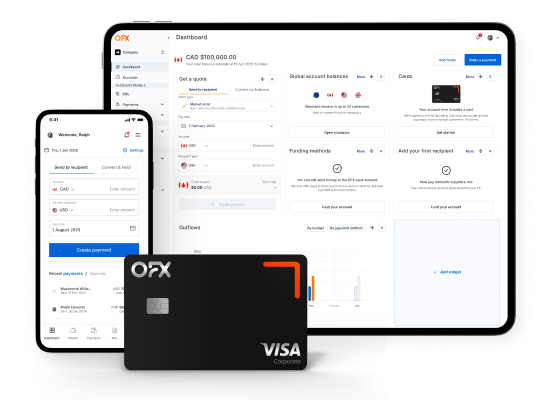
Track spend, issue corporate cards, and manage reimbursements all in one place with integrated expense management software.
How can expense management software improve manual expense processes?
While no two platforms are the same, most expense management systems follow a similar basic structure:
- Submit expenses: Employees scan receipts or enter purchase details for their own expenses using a mobile app or desktop dashboard.
- Approve expenses: Managers review each expense and approve or reject based on company guidelines.
- Reimburse employees: Once approved, reimbursements are processed through integrated payroll or banking systems.
- Sync to accounting: All data is synced with your accounting software to keep financial records up to date.
With the right tools, this system can be made even more efficient. Most modern software solutions also offer:
- OCR receipt scanning to capture data from paper receipts
- Automated approval workflows that match your internal processes
- Policy enforcement tools that ensure expense claims are compliant
- Multi-currency support for businesses with global operations
- Real-time expense reports for greater financial visibility
These features help reduce manual errors, eliminate unnecessary delays, and give finance teams the clarity they need to make well-informed decisions.
9 of the best expense management software solutions in 2026.
To help you narrow your search for the right platform, we’ve reviewed some of the top expense management software providers available to Canadian businesses:
1. OFX.
Best for: Businesses with international payments and cross-border expenses.
OFX combines global payment tools with built-in expense management capabilities, making it a strong fit for Canadian businesses that operate across borders.
With OFX Spend Management, you can issue corporate cards with pre-set spending limits, capture receipts automatically, and manage reimbursements in one place. OFX supports 30+ currencies through its multi-currency account, and integrates with platforms like Xero and QuickBooks for seamless accounting sync. Dedicated Canadian support is available 24/7.
| Pros: | Cons: |
|---|---|
| Multi-currency corporate cards in 30+ currencies with 1% cashback | Best value is unlocked with cross-border use cases |
| Combined expense management and international payments in one platform | Full Suite plan required for advanced spend management features |
| 24/7 human support with dedicated Canadian team | Newer to the pure expense management category compared to legacy providers |
| Integrates with Xero and QuickBooks |
Pricing: Standard plan at $0/user/month; Full Suite at $75 CAD/month inclusive of 5 users, plus $10 for each additional user.
2. QuickBooks.
Best for: Small Canadian businesses that want expense tracking built into their accounting software.
QuickBooks3 is a household name for small business accounting in Canada. Its expense tracking features allow users to scan receipts, tag categories, and view financial reports in real time. The platform is widely adopted across Canadian industries and offers strong GST/HST tracking capabilities. However, employee expense claim functionality requires the Advanced plan, which can be a significant jump in cost for smaller teams. QuickBooks doesn’t offer built-in corporate cards for managing employee spend, which may require businesses to add another provider.
| Pros: | Cons: |
|---|---|
| Deep accounting integration (it is the accounting software) | Employee Expense Claims feature requiresAdvanced plan ($220 CAD/month)5 |
| Strong GST/HST and Canadian tax category support | No built-in corporate cards for employee spend management |
| Mobile receipt capture and bank feed matching | Limited approval workflow customisation on lower tiers |
| Large Canadian user base with extensive support resources |
Pricing: Simple Start at $21 CAD/month; Plus at $42 CAD/month; Advanced at $220 CAD/month.
3. SAP Concur.
Best for: Large enterprises with complex, multi-entity expense management needs.
SAP Concur5 is a global leader in enterprise-grade expense management. Designed for large companies, it supports complex approval workflows, mobile submissions, and deep integration with enterprise resource planning (ERP) systems. It’s robust, scalable, and ideal for businesses that manage large teams across multiple locations. SAP Concur also offers strong travel expense management with integrated booking tools.
| Pros: | Cons: |
|---|---|
| Highly customisable approval workflows for complex organisational structures | Custom-only pricing, typically suited to enterprise budgets |
| Deep ERP integration (SAP, Oracle, and more) | Complex implementation that may require dedicated IT resources |
| Built-in travel booking and itinerary management | Steeper learning curve for smaller teams |
| Strong compliance and audit trail capabilities |
Pricing: Custom pricing only. Contact SAP Concur for a quote.
4. Expensify.
Best for: Canadian SMEs wanting a mobile-first expense tracking experience.
Expensify6 is a mobile-first platform trusted by many Canadian SMEs. It automates receipt capture using SmartScan technology, matches transactions, and integrates with accounting tools like QuickBooks and NetSuite. The platform is user-friendly and offers a free plan for individuals. One drawback for Canadian businesses: Expensify bills exclusively in USD7, which adds a small currency conversion cost to each invoice.
| Pros: | Cons: |
|---|---|
| SmartScan receipt capture is among the fastest in the category | Billed in USD, adding conversion costs for Canadian businesses |
| Free plan available for individuals and very small teams | Per-user pricing can become expensive as teams grow |
| Integrates with QuickBooks, Xero, NetSuite, and Sage Intacct | Advanced features (multi-level approvals, custom workflows) require higher tiers |
| Real-time expense reporting and policy enforcement |
Pricing: Collect plan at $5 USD/user/month; Control plan at $9 USD/user/month (billed in USD).
5. Zoho Expense.
Best for: Businesses already using the Zoho ecosystem who want affordable, flexible expense management.
Zoho Expense8 combines flexible pricing with a powerful set of features, including receipt scanning, custom approval flows, and mileage tracking. The platform offers a free tier for up to 3 users, making it accessible for micro-businesses testing the waters. Zoho Expense hosts data on Canadian servers in Montreal and Toronto, which is a plus for businesses with data residency concerns. It’s particularly well-suited for companies already using other Zoho apps, thanks to smooth integration across the full suite.
| Pros: | Cons: |
|---|---|
| Free tier available for up to 3 users | Initial setup and configuration can be time-consuming |
| Canadian data centres in Montreal and Toronto | Fewer native integrations outside the Zoho ecosystem |
| Configurable mileage rates for CRA compliance | Reporting features are less advanced than enterprise tools |
| Strong integration across the Zoho product suite |
Pricing: Free for up to 3 users; Standard at $4 CAD/active user/month; Premium at $7 CAD/active user/month.
6. Sage Intacct.
Best for: Mid-market and enterprise companies needing deeper financial controls and multi-entity management.
Sage Intacct9 is designed for mid-market and enterprise companies needing deeper financial controls. It features advanced reporting, approval automation, and multi-entity management. Sage Intacct is distinct from the Sage HR expense module; it focuses on financial management with expense tracking as part of a broader ERP capability. It integrates with Canadian payroll providers like Sage 50 and ADP.
| Pros: | Cons: |
|---|---|
| Advanced multi-entity and multi-currency financial management | Custom pricing, typically higher than SME-focused tools |
| Deep reporting and dashboard capabilities | Requires implementation support for initial setup |
| Integrates with Sage 50 and Canadian payroll systems | May be more functionality than smaller businesses need |
| Strong audit trail and compliance features |
Pricing: Custom pricing. Contact Sage for a quote.
7. Workday.
Best for: Large enterprises looking for expense management within a full ERP and HCM platform.
Workday10 is a full ERP system trusted by large enterprises. Its expense module supports mobile reporting, approval workflows, and integration with payroll and finance tools. Workday’s strength is its unified platform approach: HR, finance, planning, and expenses all live in one system. It typically requires in-house IT for setup and maintenance.
| Pros: | Cons: |
|---|---|
| Unified platform with HR, finance, and planning modules | Complex and costly implementation process |
| Strong mobile expense reporting capabilities | Requires dedicated IT resources for ongoing maintenance |
| Enterprise-grade security and compliance | Overkill for businesses with fewer than 500 employees |
| Scales for organisations with thousands of employees |
Pricing: Custom pricing. Contact Workday for a quote.
8. Xero.
Best for: Small to mid-sized Canadian businesses wanting cloud-based accounting with built-in expense tracking.
Xero11 is a cloud-based accounting software that’s gaining popularity in Canada. It supports expense tracking, multi-currency reporting, and easy integration with third-party apps. Xero’s expense claim feature lets employees submit receipts via mobile, and managers can approve claims within the platform. However, it lacks corporate cards, so businesses needing spend controls at the point of purchase might need an additional provider like OFX.
| Pros: | Cons: |
|---|---|
| Clean, intuitive interface with strong mobile app | No built-in corporate cards |
| Multi-currency reporting and bank feeds | Expense claims feature only available on Growing and Comprehensive plans |
| Large marketplace of third-party integrations | Limited approval workflow customisation compared to dedicated expense tools |
| Growing Canadian user base with local support |
Pricing: Starter at $22 CAD/month; Standard at $44 CAD/month; Premium at $66 CAD/month.
9. FreshBooks.
Best for: Freelancers and small teams in Canada looking for simple expense tracking and client billing.
FreshBooks12 is a Toronto-based accounting software ideal for freelancers and small teams. It offers straightforward tools for tracking expenses, capturing receipts, and managing client billing. As a Canadian-built platform, it handles CAD billing natively and supports GST/HST tracking. While accessible, it may lack some of the advanced approval workflows and corporate card features needed by larger businesses.
| Pros: | Cons: |
|---|---|
| Canadian-built, with native CAD billing and GST/HST support | Limited approval workflows for teams larger than 10 |
| Simple, clean interface with fast onboarding | No built-in corporate cards |
| Strong invoicing and client billing integration | Expense features are basic compared to dedicated spend management platforms |
| Affordable pricing starting at $11 CAD/month13 |
Pricing: Lite at $11 CAD/month; Plus at $22 CAD/month; Premium at $38 CAD/month.
Compare the top expense management solutions for Canadian businesses.
Here’s how the top 9 expense management platforms stack up across the features that matter most for Canadian businesses:
| Platform | Corporate cards | OCR receipt scanning | Multi-currency | Accounting integration | Mobile app | Pricing (starting) | Canadian payroll integration |
|---|---|---|---|---|---|---|---|
| OFX | ✓ | ✓ | ✓ (30+ currencies) | QuickBooks, Xero | ✓ | $0/user/month (Standard) | Via accounting sync |
| QuickBooks | ✗ | ✓ | ✓ | Native | ✓ | $21 CAD/month | ADP, Sage 50 |
| SAP Concur | ✓ | ✓ | ✓ | SAP, Oracle, QuickBooks | ✓ | Custom pricing | ADP, Nethris |
| Expensify | ✓ | ✓ | ✓ | QuickBooks, Xero, NetSuite | ✓ | $5 USD/user/month | Via accounting sync |
| Zoho Expense | ✗ | ✓ | ✓ | Zoho Books, QuickBooks, Xero | ✓ | Free (3 users) | Via accounting sync |
| Sage Intacct | ✗ | ✓ | ✓ | Native (Sage) | ✓ | Custom pricing | Sage 50, ADP |
| Workday | ✗ | ✓ | ✓ | Native | ✓ | Custom pricing | ADP, Ceridian |
| Xero | ✗ | ✓ | ✓ | Native | ✓ | $22 CAD/month | Gusto, ADP |
| FreshBooks | ✗ | ✓ | Limited | Native | ✓ | $11 CAD/month | Gusto |
Quick pricing comparisons:
- Free options: Zoho Expense (up to 3 users), Expensify (individuals).
- Under $50 CAD/month: FreshBooks Lite ($11), QuickBooks Simple Start ($21), Xero Starter ($22).
- $50 to $100 CAD/month: OFX Full Suite ($75 for 5 users).
- $100+ or custom pricing: QuickBooks Advanced ($220), SAP Concur, Sage Intacct, Workday.
What are the benefits of modern expense management systems?
Modern expense management systems provide advantages that can directly impact your bottom line. By transitioning from manual processes to automated solutions, you can experience benefits across the following areas of your business operations.
Operational efficiency.
- Reduced processing costs: Automated systems cut expense processing costs by up to 70% compared to manual methods.
- Time savings: OCR technology decreases data entry time by 50%15 or more, allowing your team to focus on strategic work.
- Streamlined workflows: Approval processes that once took weeks can be completed in days or even hours.
For example, your accounting team can process hundreds of receipts in minutes rather than hours, freeing up time for higher-value financial analysis and planning.
Financial control and visibility.
- Real-time expense visibility: across departments, projects, and currencies helps you spot overspending patterns before they escalate.
- Automated policy enforcement: catches non-compliant claims at the point of submission.
- Detailed audit trails: simplify internal reviews and external audits.
- Simplified GST/HST reporting: for CRA compliance, with tax amounts automatically captured and categorised from receipt data
Employee experience.
- Faster reimbursement cycles: reduce friction and boost employee satisfaction.
- Mobile-first submission: means employees can file expenses on the go.
- Clear status tracking: keeps employees informed throughout the approval process.
- Reduced back-and-forth: between employees and finance teams.
Which expense management software is right for your business?
The right platform depends on your team size, spending patterns, and how much of your business operates across borders. Here are scenario-based recommendations to help you shortlist:
- Freelancers and micro-businesses (1 to 5 people): Zoho Expense’s free tier offers simple receipt capture and expense categorisation without a steep learning curve.
- Canadian SMEs wanting accounting-integrated simplicity: QuickBooks. If your business already runs on QuickBooks for bookkeeping and tax filing, adding expense tracking within the same platform reduces complexity. Be prepared for the Advanced plan cost if you need employee expense claims.
- Businesses with cross-border and multi-currency needs: OFX. If your team pays overseas suppliers, manages expenses in multiple currencies, or needs multi-currency corporate cards, OFX brings expense management and international payments together in one platform.
- Enterprise organisations with 500+ employees: SAP Concur or Workday. Both offer the depth of configuration, ERP integration, and compliance tooling that large organisations require.
Why are Canadian businesses choosing OFX for expense management?
Canadian businesses with international operations are turning to OFX because we bring together spend management and global payments in a single platform.
Here’s 4 things that sets OFX apart:
1. Spend management built for global businesses.
- Issue corporate cards and virtual cards with pre-set spending limits and merchant restrictions.
- Capture receipts automatically and manage reimbursements within the platform.
- Set up automated approval workflows by team, department, or spending threshold.
- Track real-time expense visibility across your entire organisation.
2. Multi-currency and international payments.
- Hold, send, and receive in 30+ currencies through your OFX multi-currency account
- Access competitive exchange rates with no hidden fees on held balances
- Use Forward Contracts and Limit Orders to manage FX risk on larger transactions
- 1% cashback on corporate card spend
3. Integrations and support
- Sync automatically with Xero, QuickBooks, and NetSuite
- Manage expenses on the go with the OFX Business App
- 24/7 access to human support specialists, including a dedicated Canadian team
4. OFX plans and pricing
OFX offers two plans designed for different business needs:
- Standard: $0/month. Includes international payments, multi-currency accounts, and basic spend tracking.
- Full Suite: $75 CAD/month inclusive of 5 users, plus $10 for each additional user. Includes advanced spend management, corporate cards, receipt capture, approval workflows, and full accounting integration.
Full suite comes with a 30-day free trial, so you can test the full platform before committing and you can check out the platform right now with our interactive virtual tour.
Expense management software FAQs.
What is the best expense management software for businesses in Canada?
The best expense management software depends on your business’s size, spending patterns, and international footprint. For businesses with cross-border needs, OFX offers multi-currency expense management alongside global payments. QuickBooks and Xero are solid choices for businesses that want expense tracking integrated into their accounting platform, while SAP Concur and Workday serve larger enterprises with complex requirements.
How does expense management software integrate with accounting systems?
Most expense management platforms sync directly with popular accounting tools like QuickBooks, Xero, and NetSuite. This integration automatically transfers approved expense data into your general ledger, reducing manual data entry and reconciliation errors. OFX, for example, offers direct integrations with Xero, QuickBooks, and NetSuite, so your expense records stay up to date without extra work.
Can expense management software handle multi-currency expenses?
Yes. Platforms like OFX, SAP Concur, and Expensify support multi-currency expense tracking. OFX goes a step further by combining multi-currency corporate cards, real-time FX rates, and international payment capabilities in one platform. This is particularly valuable for Canadian businesses paying suppliers or employees in currencies other than CAD.
How does expense software help ensure compliance?
Expense management software enforces company spending policies automatically. Features like pre-set spending limits, merchant category restrictions, and custom approval workflows help prevent out-of-policy spending before it occurs. Automated audit trails and receipt matching also make it easier to prepare for internal reviews and external audits.
Can these tools reimburse employees automatically?
Many platforms support automated reimbursements once an expense claim is approved. The reimbursement is processed through integrated payroll or banking systems, reducing the delay between approval and payment. This is a significant improvement over manual processes where employees might wait weeks for reimbursement.
Do these tools support virtual corporate cards?
Yes. OFX, Expensify, and Float all offer virtual corporate cards that can be issued instantly. Virtual cards are useful for managing online subscriptions, controlling per-vendor spending, and reducing fraud risk. OFX and Float both offer 1% cashback on card spend.
Is expense software worth it for small teams?
For teams of five or more, the time savings from automated receipt capture, approval workflows, and accounting sync typically outweigh the cost. Free options like Zoho Expense (up to 3 users) make it possible to start without any software cost. Even at 10 employees, the hours saved on manual processing each month can justify a paid plan.
What are the top expense management software solutions in Canada in 2026?
Here are some of the top expense software solutions in Canada:
- OFX
- QuickBooks
- SAP Concur
- Expensify
- Zoho Expense
- Sage Intacct
- Workday
- Xero
- Freshbooks
What’s the best option for managing global spending?
OFX is designed for businesses with international operations. Its combination of multi-currency accounts, corporate cards in 30+ currencies, competitive FX rates, and integrated expense management makes it a purpose-built solution for global spend. This is especially relevant for Canadian businesses that regularly pay overseas suppliers, manage remote teams abroad, or handle expenses in multiple currencies.
How much does expense management software cost in Canada?
Pricing ranges from free (Zoho Expense free tier) to $220+ CAD/month for enterprise-grade tools like QuickBooks Advanced. Most SME-focused platforms fall between $4 and $100 CAD/month. OFX offers a Standard plan at $0/month and a Full Suite plan at $75 CAD/month inclusive of 5 users. SAP Concur, Sage Intacct, and Workday use custom pricing that reflects enterprise-level budgets.
What is the difference between expense management software and accounting software?
Accounting software (such as QuickBooks, Xero, or Wave) manages a business’s overall financial records, including invoicing, bank reconciliation, tax filing, and financial reporting. Expense management software is specifically built for the employee reimbursement workflow: mobile submission, manager approval, policy enforcement, status tracking, and payroll or accounting export. Many businesses use both together, with the expense platform feeding approved claims directly into their accounting system.
Looking for a better way to manage
your business expense?
Sources
- https://www.cpapracticeadvisor.com/2020/08/03/finance-departments-spending-520-hours-per-year-on-manual-ap-tasks/39599/
- https://www.concur.com/en-us/resource-center/reports/forrester-improve-travel-expense-invoice-management-solution-to-drive-better-ex
- https://quickbooks.intuit.com/ca/
- https://quickbooks.intuit.com/ca/pricing/
- https://www.concur.ca/expense-management
- https://www.expensify.com/
- https://www.expensify.com/pricing
- https://www.zoho.com/ca/expense/pricing/
- https://www.sage.com/en-ca/sage-business-cloud/intacct/product-capabilities/extended-capabilities/time-and-expense-management/
- https://www.workday.com/en-ca/products/spend-management/expenses.html
- https://www.xero.com/ca/pricing-plans/
- https://www.freshbooks.com/expenses-and-receipts-tracking
- https://www.freshbooks.com/en-ca/pricing
- https://floatfinancial.com/press-release/float-secures-100-million-in-funding-to-unlock-over-a-billion-in-spending-power/
- https://www.peeriosity.com/shared-services/articles/2018/04/improving-accounts-payable-processing-efficiency-through-ocr-technology/
- https://apps.apple.com/us/app/ofx-business-au/id1661719411
IMPORTANT: This article was updated in June 2026. The information is based on our online research at time of publication. This publication is provided for general information purposes and a reader should consider the specific requirements of their business when evaluating providers. This information does not constitute legal, tax or other professional advice from CanadianForex Limited trading as OFX or its affiliates, and it is not intended as a substitute for obtaining advice from a financial advisor or any other professional. If you would like to request updated information, please contact us at business@ofx.com. Please see our pricing pages for the most up to date OFX pricing and fee information.